


 Samuel
When conducting business online, verifying the authenticity of documents is essential for preventing fraud and maintaining trust. Document verification helps organizations confirm that identity documents are genuine, detect alterations or counterfeiting, and ensure that the information provided by customers is accurate.
This process plays an important role in customer onboarding, particularly for businesses that need to verify identities remotely. With digital verification tools, organizations can examine document details, validate information, and support faster, more reliable identity checks.
What Is Document Verification?
Document verification is the process of confirming the authenticity of documents such as passports, driver’s licenses, national identity cards, and other official identification documents. The process involves examining the document’s physical or digital features to determine whether it is genuine, has been altered, or contains inaccurate information.
Physical document verification involves inspecting security features such as watermarks, holograms, texture, and other physical characteristics. Digital document verification uses technology such as Optical Character Recognition (OCR) and AI-powered tools to extract information, analyse document features, and identify signs of tampering or forgery.
The Document Verification Process
The document verification process typically involves four main steps:
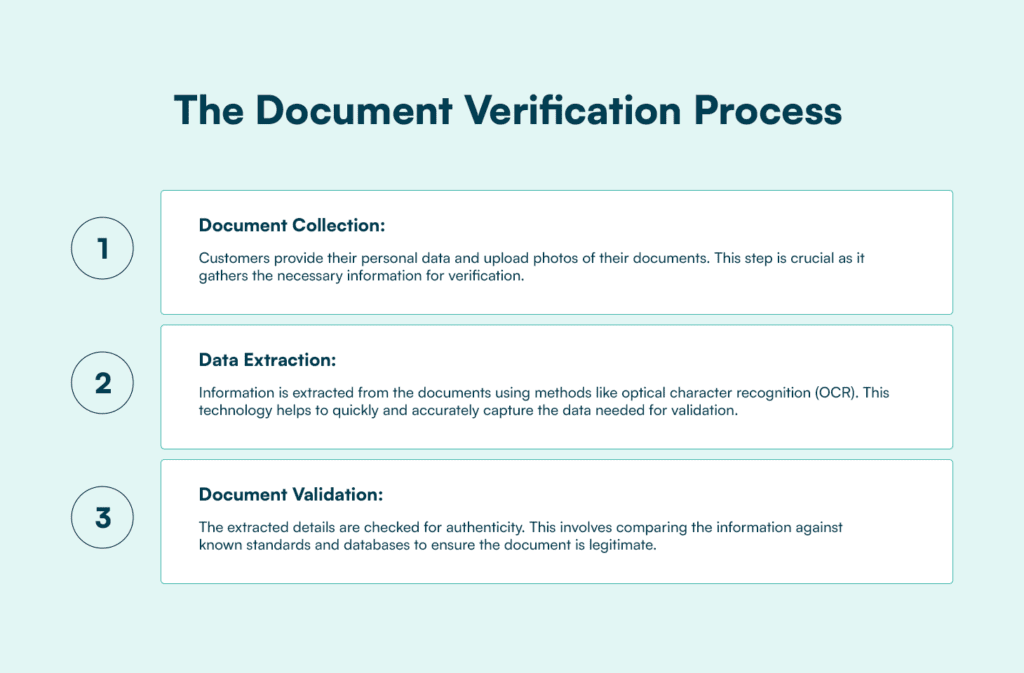
- Document Collection: Customers provide their personal data and upload photos of their documents. This step is crucial as it gathers the necessary information for verification.
- Data Extraction: Information is extracted from the submitted documents using technologies like optical character recognition (OCR). This helps capture important details, including names, document numbers, and dates, for further checks.
- Document Validation: The extracted details are examined to determine whether the document is authentic and has been altered or tampered with. Depending on the verification system, this may involve checking security features and comparing information against relevant databases.
- Manual Verification: If a document is flagged as suspicious during automated checks, it may undergo manual verification. A human reviewer examines the document and its details to determine whether it is authentic or requires further investigation.
Importance of Document Verification
Document verification is essential for several reasons:
- Fraud Prevention: Verifying documents helps organizations identify forged, altered, or counterfeit documents before they are used for fraudulent activities. This reduces the risk of identity theft, financial fraud, and unauthorized access to services. This is particularly important in industries dealing with sensitive information or high-value transactions. To learn more about identifying forged, altered, and manipulated identity documents, read Fraudulent Document Detection: How to Spot Tampered IDs and Forged Documents.
- Customer Trust: Accurate document verification helps businesses establish confidence in their onboarding processes. Knowing that their documents are being securely and accurately verified assures them that their information is safe.
- Industry Applications: Document verification is used across various industries, including financial institutions, healthcare, and e-commerce, to ensure the authenticity of documents, protect against fraud, and support KYC and KYB checks.
Physical vs. Digital Document Verification
Physical Document Verification
Physical document verification involves examining the physical characteristics of a document to determine whether it is genuine. This includes checking features such as texture, colour, holograms, watermarks, and other security elements. The process typically requires a trained specialist to inspect the document and identify signs of forgery or tampering.
Digital Document Verification
Digital document verification uses technology to examine documents remotely without requiring physical inspection. Tools powered by Artificial Intelligence (AI) and Optical Character Recognition (OCR) can extract document information, analyse security features, and compare details to identify possible inconsistencies or signs of alteration. This makes it easier for businesses to verify customer documents during online onboarding. For a closer look at how technology supports international document checks, read How to Automate International Passport Verification: What Businesses Need to Know.
Why Businesses Use Document Verification
Businesses use document verification for several reasons:
- Enhanced Risk Management: Document verification offers a convenient way to manage risk by helping businesses confirm the authenticity of documents.
- Increased Efficiency: Automated verification processes are faster and more efficient than manual checks, reducing the time needed to verify documents.
- Global Access: Digital verification enables businesses to verify documents from anywhere in the world, supporting their global operations. For more information on verifying identities across different markets, read Document Verification for Global KYC Onboarding.
- Regulatory Compliance: Adhering to regulations and requirements such as Know Your Customer (KYC), Know Your Business (KYB), Anti-Money Laundering (AML), and Customer Due Diligence (CDD) is critical in many industries. Document verification helps businesses meet these requirements.
Challenges of Manual Document Verification
Manual document verification can be challenging due to several factors:
- Lengthy and Labor-Intensive: The process requires skilled specialists and extensive training, making it time-consuming and labor-intensive.
- Risk of Human Error: Manual processes are prone to mistakes, which can lead to incorrect verification decisions and increased risks for the organization.
- Slow Processes: The time required for manual verification can cause delays and lead to customer frustration.
Learn how businesses can identify forged and manipulated documents in Stop Document Fraud Before It Costs You: How Prembly Keeps Your Business Secure.
How Prembly’s Document Verification Works
Prembly offers identity verification solutions that include document verification, facial recognition, liveness detection, and biometrics. Its online document verification solution helps businesses examine submitted documents and receive verification results.
Registered Prembly account holders can log in to access the dashboard. New businesses must first sign up and submit the required business documents and licences for account verification. Once their accounts have been approved, they can access the dashboard and begin conducting verification checks.
To use the Document Verification feature, account holders can navigate to the feature on their Prembly dashboard, select the region where the document was issued, and upload the document they want to verify.
Users can capture an image of an ID card, passport, or other supported document for analysis. Prembly also provides real-time feedback to help users capture clear, high-quality document images for verification.
Choosing Document Verification Software
When selecting a document verification provider, consider the following factors:
- Global Document Coverage: Ensure the provider can verify documents issued in different countries. This is particularly important for businesses that serve customers across multiple regions. Prembly supports document verification across different markets.
- Ease of Implementation: Look for solutions that can be easily integrated into your existing systems. A straightforward integration process helps businesses incorporate document verification into their workflows.
- Language Support: Check whether the provider supports multiple languages. This is important for businesses serving customers from different linguistic backgrounds. Prembly supports multiple language options.
FAQs
1. What Is Document Verification?
Document verification is the process of checking the authenticity and validity of documents to determine whether they are genuine or have been altered. It helps businesses confirm the information provided by customers and detect potentially fraudulent documents.
2. How Does the Document Verification Process Work?
The document verification process typically involves four steps: document collection, data extraction, document validation, and manual verification. These steps help businesses examine submitted documents, extract relevant information, identify inconsistencies, and review documents flagged for further investigation.
3. What Documents Can Be Verified?
Common documents used for identity verification include passports, national identity cards, driver’s licences, and other government-issued identification documents. The types of documents supported depend on the verification provider and the countries it covers.
4. What Is the Difference Between Manual and Digital Document Verification?
Manual document verification involves a person physically examining a document to check its authenticity and security features. Digital document verification uses technology such as Optical Character Recognition (OCR) and AI-powered tools to extract information, analyse document features, and identify possible signs of tampering.
5. Why Is Document Verification Important for Businesses?
Document verification helps businesses prevent identity fraud, manage risks, improve onboarding efficiency, and support regulatory compliance. It also allows organizations to verify customer identities and establish greater trust in their operations.
Learn more: docs.prembly.com
Sign up: app.prembly.com.